Frequently Asked Questions
General pgEdge
Who is using pgEdge?
pgEdge is used by an array of SaaS, AI, financial services and technology companies, along with multiple government agencies in the US Government and Europe.
What is “Spock”?
Spock is a pgEdge-developed PostgreSQL extension that supports asynchronous multi-master (active-active) logical replication, making it possible for pgEdge Distributed Postgres to be fully distributed with reads and writes taking place at any node. It is installed by default as part of pgEdge Enterprise Postgres, so that your installation is Distributed-Ready, providing an easy upgrade path to pgEdge Distributed Postgres.
Is the Spock source code available?
Yes. Spock is a fully open source project under the PostgreSQL License. The source code is publicly available on GitHub, with no restrictions beyond those of the standard PostgreSQL community license.
Is pgEdge SOC 2 certified?
Yes. pgEdge has achieved SOC 2 Type II certification across all of its products, including pgEdge Distributed Postgres and pgEdge Enterprise Postgres. This certification confirms that our security, availability, and operational processes meet rigorous industry standards, and reflects our commitment to protecting customer data and maintaining trust across all deployment models.
Do pgEdge products include Software Bills of Materials (SBOMs)?
Yes. All pgEdge products and components, including pgEdge Distributed Postgres, pgEdge Enterprise, and supporting extensions such as Spock, are delivered with SBOMs (Software Bills of Materials). These SBOMs provide transparency into the open source and third-party components included in each release, supporting compliance, security auditing, and supply chain risk management.
PostgreSQL
To what extent is pgEdge based on the standard PostgreSQL engine?
pgEdge is built 100% on standard PostgreSQL, with a minimal set of targeted patches to enable advanced replication capabilities required by pgEdge Distributed Postgres, such as support for conflict-free delta apply columns in Spock.
These patches are fully open source and licensed under the standard PostgreSQL license. They are included by default in pgEdge Enterprise, making it “Distributed-Ready” and providing a seamless upgrade path to pgEdge Distributed when you’re ready to enable write-anywhere, multi-region replication.
What versions of PostgreSQL does pgEdge currently support?
For pgEdge Enterprise Postgres (single-cluster, self-hosted), we currently support PostgreSQL versions 16 and 17.
For pgEdge Distributed Postgres, we currently support PostgreSQL v15, v16, and v17.
Do I need to change my database application code or database schemas?
For pgEdge Enterprise Postgres, no changes are required. It is a drop-in replacement for standard PostgreSQL and is fully compatible with your existing applications and database schemas.
For pgEdge Distributed Postgres, most applications work with little or no modification, especially when the schema design avoids write conflicts. Our experience across a wide range of PostgreSQL workloads shows that many real-world applications are naturally “conflict free.”
However, distributed replication does require a few key schema considerations:
All replicated tables must have a primary key. Logical replication depends on primary keys to identify and synchronize changes across nodes.
Standard PostgreSQL sequences do not work correctly in a distributed, multi-master environment, as they are not replicated and can lead to ID collisions. To solve this, pgEdge includes a built-in Snowflake Sequences extension, which fully replaces the standard SEQUENCE mechanism. The pgEdge Snowflake extension generates globally unique, time-sortable 64-bit integer IDs using the widely adopted Snowflake ID algorithm. Each ID encodes a timestamp (epoch), node ID, and sequence counter into a single packed BIGINT. It includes drop-in replacements for nextval() and currval(), as well as helper functions to extract the embedded metadata (timestamp, node ID, and local sequence value) from each generated ID. This solution makes it easy to use surrogate keys in distributed schemas without needing UUIDs or custom logic, and without sacrificing performance or sortability.
If any schema or application changes are needed to optimize for distribution, our team is available to assist. These changes are typically minimal and straightforward.
Licensing
How are you licensing the source code developed by pgEdge?
All publicly available pgEdge-developed source code is now fully open source and licensed under the standard PostgreSQL License. This includes Spock, our advanced logical replication extension. We’ve adopted the same permissive license used by PostgreSQL itself to encourage openness, transparency, and community collaboration.
pgEdge includes a minimal set of patches to the PostgreSQL core to support advanced conflict-avoidance and delta-apply functionality in Spock. This patch is also licensed under the PostgreSQL License and has been submitted to the community for potential inclusion in future versions of PostgreSQL.
Why are you charging for production usage of pgEdge? I thought you said you were open source.
Both pgEdge Enterprise Postgres and pgEdge Distributed Postgres are fully open source. All pgEdge-developed runtime components, including Spock and the necessary PostgreSQL patches, are licensed under the standard PostgreSQL License and available on GitHub. Anyone is free to use, modify, and deploy them independently at no cost.
We charge for production usage when customers choose to rely on our commercial offering, which delivers significant additional value beyond the open source components. This includes:
Pre-built and tested binaries for supported environments
System-level packaging, configuration, and deployment tooling
Access to production-grade support and SLAs
Timely delivery of bug fixes and security patches
Early access to new features and improvements
This commercial model allows us to fund ongoing development while giving users the flexibility to choose between self-managing the open source components or relying on our supported distribution for production needs.
pgEdge Enterprise Postgres
What is pgEdge Enterprise Postgres?
pgEdge Enterprise Postgres is a hardened, enterprise-grade distribution of PostgreSQL, built and packaged by pgEdge. It includes performance, manageability, and replication enhancements, enterprise-ready extensions, and an easy upgrade path to pgEdge’s distributed write-anywhere architecture.
How is pgEdge Enterprise Postgres different from pgEdge Distributed Postgres?
pgEdge Enterprise Postgres is a self-hosted, single-cluster PostgreSQL distribution designed for organizations that want enterprise-class PostgreSQL with commercial support, advanced extensions, and full compatibility—without the complexity of a distributed architecture.
In contrast, pgEdge Distributed Postgres is a fully distributed, multi-master PostgreSQL product with built-in multi-master replication, high availability, and support for active-active deployments across regions.
pgEdge Enterprise Postgres includes everything needed to run PostgreSQL in production and is “Distributed-Ready” - you can enable Spock at any time to upgrade to a fully distributed setup with no need to reinstall or reconfigure your database foundation.
What’s included in the Enterprise Postgres package?
The package includes PostgreSQL 16 & 17 with pgEdge patches, plus key enterprise extensions such as Spock, pgAudit, pgBackRest, pgBouncer, PostGIS, pgVector, LOLOR, and the Snowflake sequence extension. All packages are built, tested, and provided via a secure repository for RHEL, Rocky Linux, AlmaLinux, Debian and Ubuntu.
Is Spock replication enabled by default?
No. Spock is included but disabled by default in the Enterprise package. Customers can enable it later to add multi-master, write-anywhere capabilities without changing their database distribution.
Which operating systems are supported?
pgEdge Enterprise Postgres supports RHEL 9 & 10, Rocky Linux 9 & 10, and compatible distributions on x86_64 and aarch64 (ARM) architectures. It also supports Debian 11, 12 and 13 (AMD and ARM) as well as Ubuntu 22.04 and 24.04 (AMD and ARM).
What kind of support is included?
A pgEdge Enterprise Postgres subscription includes 24x7x365 support from our PostgreSQL experts, with defined SLAs for issue response and resolution. Optional dedicated Forward Deployed Engineer services are also available.
How is pgEdge Enterprise Postgres licensed?
The Enterprise Postgres packages are available and supported as part of a paid subscription. This includes the software, tested builds, security updates, and support. Many included extensions are open source, but the bundled build and packaging are pgEdge-maintained.
Can I migrate from community PostgreSQL to pgEdge Enterprise Postgres?
Yes. Our packages are designed to be drop-in replacements for community PostgreSQL. Migration is supported from previous community versions with standard PostgreSQL upgrade methods. Migration assistance is available as part of the Support Subscription.
pgEdge Distributed Postgres
Can pgEdge database nodes be geographically distributed?
Yes! We have designed pgEdge Distributed Postgres to support placement of nodes across global networks. In particular you can have pgEdge nodes running in geographically disparate cloud regions across your cloud provider’s network.
Is pgEdge Distributed PostgreSQL ACID compliant?
pgEdge is a multi-master distributed database system built on standard PostgreSQL and designed for low latency, high availability and seamless failovers. It relies on Postgres to guarantee ACID properties at the node level to clients. In a distributed cluster — that may span multiple cloud regions or datacenters — pgEdge offers eventual consistency between nodes using a configurable policy (e.g. last-writer-wins) for conflict resolution, along with conflict-free delta apply columns (i.e. CRDTs) for running sum fields. This allows for independent, concurrent and eventually consistent updates across multiple nodes.
When workloads are partitioned optimally, customers using pgEdge can enjoy low latency and high availability without compromising the practical consistency needs of their applications. According to the PACELC theorem, which expands on the CAP theorem, distributed systems must make trade-offs not only if there is a Partition (P), choosing between Availability (A) and Consistency (C), but also else (E), during normal operation, between Latency (L) and Consistency (C).
pgEdge is designed to prioritize availability and low latency, making it well suited for geo-distributed deployments that require responsiveness and regional fault tolerance. While this approach favors eventual consistency during partitions and emphasizes fast response times during normal conditions, pgEdge includes conflict-resolution and delta-apply mechanisms to preserve logical correctness. Our support team can assist in optimizing your workload and schema design to meet the specific availability, latency, and consistency needs of your application.
Can I also have read-only nodes in a pgEdge Distributed cluster for redundancy across availability zones?
Yes. You can configure synchronous read-only nodes in availability zones within the same region for local within-region failover.
Does pgEdge support access from application code running in edge platforms like Cloudflare Workers, Fastly Edge Compute, Akamai or Vercel?
Yes! Please see the following resources:
Blog post to see how to use pgEdge with platforms like Cloudflare Workers.
Video and download of using pgEdge Distributed Postgres with Akamai Cloud.
What do I need to do with my application logic layer?
For pgEdge Distributed Postgres: VM Edition and pgEdge Distributed Postgres: Cloud Edition, to achieve the maximum latency benefit you will want to replicate your application logic so it is resident in each of the same cloud regions or data centers where you are placing pgEdge database nodes. Use automation to ensure your application code stack and infrastructure are configured identically in each region. Tools such as Terraform or CloudFormation for infrastructure and CI/CD pipelines for code deployments are highly recommended. pgEdge Distributed Postgres: Cloud Edition ensures the database infrastructure and software are deployed securely and identically across your chosen regions. If you are using an edge platform such as Cloudflare Workers, your application logic is already available across the edge network you are utilizing.
What are “conflict free delta apply columns”?
Standard logical replication by itself does not correctly handle “running sum” columns for items such as inventory and account balances. pgEdge Distributed Postgres supports conflict-free delta apply columns that use a delta application technique to ensure that for a potentially conflicting transaction the deltas at each node are captured and replicated to ensure a correct end result. This delivers the same behavior as Conflict-free Replication Data Types (CRDTs) for running sum columns in certain other distributed database systems. This simpler approach for a common use case reduces programming complexities associated with CRDTs. More advanced capabilities for implementing other Conflict-free Replication Data Types will be available via user-defined functions in a future release; please contact pgEdge support for more information.
Is pgEdge Distributed Postgres available as a free download?
Yes. pgEdge Distributed Postgres is available as a free download at https://www.pgedge.com/download. It can be used at no cost for development, testing, and evaluation purposes.
For production deployments, we offer commercial subscriptions that include enterprise support, certified builds, security updates, and access to new features. This ensures a stable and secure experience when running pgEdge in mission-critical environments.
How many database nodes does pgEdge Distributed Postgres - VM Edition currently support?
We currently support up to 7 database nodes in a cluster. However for many applications we are finding just three database nodes, placed in appropriate locations relative to incoming user traffic, can greatly improve data latency experienced by application users. For example, locating nodes on each of the US east and west coasts plus a location in Europe is a good choice for SaaS, e-commerce or general web applications servicing North American and European users.
pgEdge Distributed Postgres can scale to a higher number of nodes using a hierarchical replication architecture to keep replication traffic between nodes at a manageable level. This is not currently supported for production usage – please contact pgEdge support to determine if your application needs this capability.
pgEdge Agentic AI Toolkit
What is the pgEdge Agentic AI Toolkit for Postgres?
It delivers enterprise-grade Postgres infrastructure for Agentic AI applications in environments with strict requirements around high availability, security, data sovereignty, and global deployment. The pgEdge AI Toolkit is the first and only solution that provides the ability to move from prototype into production for both new applications as well as an existing Postgres database. Other vendors on the market offer limited options, focusing on creating prototypes that are not in production or enterprise-grade, or only allow the building of net-new apps.
Is the pgEdge Agentic AI Toolkit open source?
The pgEdge Agentic AI Toolkit components are fully open-source under the PostgreSQL License. pgEdge takes a different approach by letting teams run Agentic AI on standard, fully open-source Postgres. Organizations gain enterprise-grade Postgres and Agentic AI capabilities without proprietary lock-in, while staying aligned with the broader PostgreSQL community.
What is the cost for the Toolkit?
As with other pgEdge Postgres products the pgEdge Agentic AI Toolkit for Postgres is fully open source via the Postgres license. The pgEdge Agentic AI Toolkit for Postgres is available for free to all Postgres users. pgEdge customers with paid subscriptions for pgEdge Enterprise Postgres or pgEdge Distributed Postgres receive support at no extra cost. Curious about giving it a try, but don’t need the enterprise support package? You’re welcome to self-host! Check it out on GitHub
What is the MCP Server?
The pgEdge Postgres MCP Server is a production-ready Model Context Protocol (MCP) implementation that enables AI assistants and code generators to interact with PostgreSQL databases through natural language. It provides read-only SQL query execution, PostgreSQL statistics access, advanced tools including hybrid search (BM25+MMR), embedding generation, guided workflows for semantic search setup and database exploration, and comprehensive security with TLS support and token authentication.
Unlike basic MCP servers that only expose schema information, pgEdge's implementation provides a complete toolkit for database interaction. It includes a production chat client with prompt caching (achieving 90% cost reduction), a modern React-based web interface with AI-powered chat for natural language database interaction, complete Docker Compose deployment, and hot reload of authentication files without server restart. The server works with any standard PostgreSQL (v14 and newer) installation - community versions, Amazon RDS, or pgEdge Distributed Postgres.
The pgEdge Postgres MCP Server makes PostgreSQL "AI-native" by providing LLMs with deep understanding of database schemas, relationships, performance metrics, and query capabilities—all while maintaining production-grade security and read-only protection.
What is the pgEdge RAG Server?
The pgEdge RAG Server is an API server that retrieves relevant content from PostgreSQL and sends it to Large Language Models for AI-powered responses. It provides multiple RAG pipelines with configurable embedding and LLM providers, hybrid search combining vector similarity and BM25 text matching, support for OpenAI, Anthropic, Voyage, and Ollama LLM providers, and token budget management to control costs.
When queries arrive, the RAG Server uses hybrid search that combines vector similarity (catching semantically related content) with BM25 keyword matching (ensuring you don't miss obvious keyword matches), and this combination tends to give better results than either method alone. Configure pipelines through a YAML file that specifies which database tables to search, which embedding model to use, and which LLM generates responses.
Key Features: Hybrid semantic + keyword search, multi-pipeline support for different use cases, flexible LLM support (cloud and local models), token budget cost controls, and streaming responses. Written in Go with TLS support for production deployment.
Works seamlessly with pgEdge Vectorizer (automatic embedding maintenance) and pgEdge Docloader (document ingestion) for a complete PostgreSQL-native RAG pipeline.
What is the pgEdge Vectorizer extension?
The pgEdge Vectorizer is a PostgreSQL extension that automates the creation and maintenance of vector embeddings for semantic search applications. Rather than requiring external services or complex data pipelines, it runs inside PostgreSQL as an extension, automatically chunking text and queuing it for embedding when you insert or update documents through triggers, while background workers process the queue asynchronously by calling your chosen embedding API and storing the results.
With a single SQL command, you can enable automatic vectorization on any table. The extension creates a chunks table to store the text segments, sets up triggers to automatically chunk new or updated content, and creates an HNSW vector index for fast similarity search. It supports multiple embedding providers including OpenAI, Voyage AI, and local models via Ollama for complete privacy and zero usage costs.
The Vectorizer is designed for developers who want to add semantic search capabilities to their PostgreSQL applications without managing separate vector databases or complex infrastructure. It handles chunking strategies (token-based, recursive character splitting), manages embedding queues with automatic retry logic, and provides built-in functions for generating query embeddings—all while keeping your documents, embeddings, and application data together in PostgreSQL with full transactional guarantees.
What is the pgEdge Document Loader?
pgEdge Document Loader is a command-line tool that automatically converts documentation from multiple formats (HTML, Markdown, reStructuredText, and SGML/DocBook) into clean Markdown and loads it directly into PostgreSQL. It extracts metadata like titles, filenames, and timestamps, supports flexible input via single files, directories, or glob patterns including recursive matching, and handles updates transactionally with automatic rollback on errors.
The tool is designed as the first step in building RAG (Retrieval-Augmented Generation) pipelines, preparing your documentation for vectorization and semantic search. Whether you're loading technical documentation, knowledge bases, or content repositories, Document Loader handles format conversion and database insertion in a single command, with support for custom metadata columns and configurable mappings to match your schema.
How do pgEdge Document Loader, Vectorizer, and RAG Server work together?
These three components form a complete end-to-end RAG (Retrieval-Augmented Generation) pipeline that runs entirely on PostgreSQL infrastructure:
Step 1: Document Loader - Ingestion Document Loader converts your documentation from multiple formats (HTML, Markdown, reStructuredText, SGML/DocBook) into clean Markdown and loads it into PostgreSQL with extracted metadata. This creates a documents table containing your content in a consistent, searchable format.
Step 2: Vectorizer - Automatic Embedding Generation pgEdge Vectorizer creates a chunks table to store text segments, sets up triggers to automatically chunk new or updated content, and enables fast similarity search. Background workers process the queue asynchronously, calling your chosen embedding API (OpenAI, Voyage AI, or local Ollama) and storing the vector embeddings, no manual intervention required.
Step 3: RAG Server - Query & Response Generation The RAG Server sits between your application and the LLM, handling retrieval using hybrid search that combines vector similarity with BM25 keyword matching. When a query comes in, it retrieves the most relevant chunks from your vectorized content, embeds the query using the same model, and sends the context to your chosen LLM (OpenAI, Anthropic Claude, or Ollama) for response generation.
The Complete Workflow:
Run Document Loader to ingest docs → stored in PostgreSQL
Enable Vectorizer on the table → automatic chunking and embedding
Deploy RAG Server with your configuration → instant semantic search API
Update docs anytime → Vectorizer automatically maintains embeddings
Query via RAG Server API → get AI-powered answers grounded in your documentation
The entire pipeline runs on PostgreSQL plus a single Go binary. No message queues, no separate vector databases, no complex orchestration. Just SQL and HTTP. Your documents, embeddings, and application data live together with full transactional guarantees and the operational tooling you already know.
What AI models are supported?
The Toolkit supports a range of models ranging from locally hosted Ollama to internet accessible frontier models such as Claude and OpenAI.
Does the pgEdge AI Toolkit support distributed deployments?
You can begin with one database and expand to multi-region deployments, while staying in control of security, compliance, and where your data lives. pgEdge takes your agentic applications from development through mission-critical production deployment, with flexible options for single-node or globally distributed architectures.
pgEdge AI DBA Workbench
What is the pgEdge AI DBA Workbench?
AI-powered monitoring and management for PostgreSQL. It watches every instance in your estate, detects problems before they become outages, and gives you an AI assistant that can diagnose, investigate, and recommend specific SQL fixes.
The Workbench is a self-hosted platform with four components: a Collector that gathers metrics, an Alerter that evaluates them, a Server that exposes an MCP endpoint and REST API, and a browser-based Client. Everything runs on your infrastructure.
Who is the AI DBA Workbench for?
Anyone running PostgreSQL. DBAs responsible for performance and uptime, platform and infrastructure teams managing a fleet, SREs on call for database problems, and engineering teams who want AI-assisted debugging against live monitoring data.
The Workbench scales from a single instance to hundreds of clusters, but you don't need a large estate to get value from it. Even with one server, the AI assistant, anomaly detection, and metric history give you capabilities that standard monitoring tools don't.
Which PostgreSQL versions does the AI DBA Workbench work with?
PostgreSQL 14 and later. That covers community Postgres, pgEdge Enterprise Postgres, pgEdge Cloud, and any mainstream DBaaS including Amazon RDS, Azure Database for PostgreSQL, Google Cloud SQL, and Supabase. No migration required. Point it at what you already run.
Is the Workbench open source?
Yes. The pgEdge AI DBA Workbench is released under the PostgreSQL License. Source code lives on GitHub at github.com/pgEdge/ai-dba-workbench. Community support is available through GitHub issues.
What does the pgEdge AI DBA Workbench cost?
The software itself is free. pgEdge Enterprise Postgres subscribers get commercial support for the Workbench at no additional cost. If you want commercial support without a pgEdge Enterprise subscription, contact sales.
Running the Workbench still costs whatever the infrastructure it runs on costs, plus whatever your chosen LLM costs. A local model is effectively free beyond the hardware. Claude or GPT-4o via API is pay-per-token.
What are the four components of the AI DBA Workbench and what do they do?
The Collector reaches out to each monitored Postgres instance over a standard connection, runs 34 configurable probes, and writes the results to a central datastore. It runs on a box of your choosing, not necessarily on your database hosts.
The Alerter reads what the Collector writes, runs threshold rules and three-tier anomaly detection over it, and raises alerts to Slack, email, Mattermost, or a webhook of your choice.
The Server is the brains. It exposes an MCP endpoint for AI clients and a REST API for programmatic access, brokers connections to your LLM provider, and enforces role-based access control with per-user conversation history.
The Client is the browser UI. Dashboards, a cluster navigator, an admin panel, and the Ellie chat interface all live here.
Do I need to install an agent on my database servers?
No. The Collector connects remotely over standard PostgreSQL protocol using a monitoring role with read-only permissions. Nothing gets installed on the database host. That matters for DBaaS environments where you cannot install anything on the host, and it matters for change-control reviews that treat host-side agents as a risk.
Can I run it in an air-gapped or on-premises environment?
Yes. Every component runs on your infrastructure. For AI capability in an air-gapped deployment, use any OpenAI-compatible local model runner: Ollama, LM Studio, llama.cpp, or EXO. No data leaves your network. This is the deployment mode for government, defense, and heavily regulated financial workloads.
What about container and Kubernetes deployment?
Docker images for each component are published and versioned. A docker-compose.yml in the repo gives you a full local stack in one command. Kubernetes deployment is supported via standard manifests; the Workbench has no hard dependency on any specific orchestrator.
What does the datastore look like and where does it live?
The Collector writes to a PostgreSQL database. You bring your own. Retention, compaction, and schema migrations are handled by the Collector itself. The datastore does not need to be on the same machine as the Collector; it does not need to be a pgEdge Postgres instance; it just needs to be Postgres 14 or later with the pgvector extension.
What is Ellie?
Ellie is the AI DBA Workbench's AI agent, embedded in the Client UI. She has 21 MCP tools at her disposal and can run EXPLAIN ANALYZE, inspect schemas, query historical metrics against current state, search the alert history, and walk through multi-step diagnostic workflows up to 50 tool iterations deep.
When Ellie finds a problem, she hands you the SQL that fixes it. You review it. You decide whether to apply it. She does not run changes against your database without you approving them first.
Is Ellie a chatbot bolted onto a dashboard?
No. A chatbot answers questions about documentation. Ellie reads your actual database state. She runs EXPLAIN ANALYZE against your real queries, queries historical metrics from your Collector, and reasons about what she finds. The difference lands the first time she catches a regression by cross-referencing three different metrics at once.
Which LLM providers does the AI DBA Workbench support?
Anthropic Claude, OpenAI, Google Gemini, and Ollama are natively supported. Beyond those, the Workbench speaks the OpenAI-compatible protocol, which means anything else that implements it works too — LM Studio, llama.cpp, EXO, vLLM, Docker Model Runner, and most self-hosted inference servers.
The Server and the Alerter each have their own LLM configuration. The Server configures the provider for Ellie and the web client chat. The Alerter configures providers independently for tier-two embeddings and tier-three reasoning, and additionally supports Voyage as an embedding provider. Switching providers in either component is a config change, not a code change.
Does Ellie remember what I tell her?
Yes. Pin context like "our busiest period is 2 to 4pm EST" or "this cluster hosts customer-facing workloads only" and it rides along in every future conversation. Memories are stored as embeddings with semantic recall, so Ellie retrieves the right context for the question in front of her without you having to tag anything manually.
What happens if my LLM provider is down?
The monitoring and alerting stack keeps running. Collector, Alerter, dashboards, and alert notifications do not require an LLM. The third tier of anomaly detection (LLM reasoning) degrades gracefully back to tier-one and tier-two detection for the duration of the outage. Ellie is offline until the provider comes back, or until you point the Server at a fallback local model.
What is MCP and why does it matter here?
MCP is the Model Context Protocol, the standard that AI coding tools use to talk to external systems. Claude Code, Cursor, VS Code with Copilot, and Codex all support it. The Workbench exposes an HTTP MCP server, which means any of those tools can pull live metrics, schema information, alert history, and EXPLAIN ANALYZE results directly into the developer's AI workflow.
What can I actually do with the MCP server?
Investigate a slow query in Cursor and immediately see the cluster context behind it. Ask your AI coding agent to check replication lag before a deploy. Pull vacuum statistics into a code review. The same 21 tools Ellie uses are exposed to any MCP client, so anything she can do, your IDE can do.
Is this the same thing as Postgres MCP Server?
Different product. pgEdge also ships a standalone Postgres MCP Server aimed at direct database access from AI coding tools. The Workbench's MCP server is purpose-built for monitoring and operational data. You can run both.
Do I need an API token to connect MCP clients?
Yes. The Server issues API tokens scoped to users and roles. Tokens are revocable from the admin panel. Every MCP request is authenticated and authorised against the same role-based access control that governs the UI.
What is "three-tier anomaly detection"?
Three layers that run together and catch different classes of problem.
Tier one is thresholds and statistical baselines. Each probe has threshold rules. Alongside them, the Workbench learns a rolling baseline per metric per instance and flags z-score deviations. This catches the obvious stuff and adapts as your workload changes.
Tier two is embedding similarity. Metric patterns are converted to vector embeddings and matched against a library of known anomaly signatures. That catches recurring patterns that threshold rules miss, like periodic locking storms or vacuum stampedes.
Tier three is LLM reasoning. For ambiguous cases, an LLM evaluates the metric history, cluster state, and recent events together and reasons about what is actually happening. This is the layer that catches the surprising stuff.
Can I tune or disable individual tiers?
Yes. Each tier is independent and each has its own configuration. If you want tier three off because you do not trust LLM classification yet, turn it off. If you want tier two to train on more history before going live, set that in config. You can also add custom threshold rules and your own anomaly signatures.
How does alerting work in practice?
Alerts have hierarchical thresholds, so you can set tighter bounds for production and more relaxed ones for staging. Alerts clear automatically when conditions normalise, so you are not manually clearing a wall of stale red. Blackout scheduling with cron recurrence handles planned maintenance windows. Notifications go to Slack, email, Mattermost, or any webhook endpoint.
Where does my data go?
Nowhere you do not send it. Metrics live in your Collector datastore. Credentials for monitored databases live in an encrypted store in the Server. The only data that leaves your infrastructure is whatever you choose to send to a cloud LLM provider if you use one. Run in air-gapped mode with a local model and nothing leaves your network full stop.
How are database credentials stored?
AES-256-GCM encryption at rest. The encryption key is managed outside the datastore. Credentials are decrypted only at connection time and never logged.
What access controls does the Workbench enforce?
Role-based access control with user, group, and privilege management. Every resource (connection, API token, memory) has an owner and a visibility scope. Users can be restricted to specific servers. API tokens inherit the permissions of the user who issued them.
Can I run it read-only for safe exploration?
Yes. Read-only mode is a per-role configuration. A user in read-only mode can see everything they have permission to view but cannot trigger any write action, including SQL execution through Ellie or the MCP server.
Does Ellie ever write to my production database?
Only if you let her. The default posture is that Ellie proposes SQL and you decide whether to run it. In the chat UI, when Ellie suggests a statement that writes to your database, it's shown with an Execute/Cancel prompt before anything runs. Read-only queries execute directly.
External MCP clients using an API token with write access bypass the UI prompt — grant write scope carefully. Write access is opt-in, scoped per connection and per role.
How do I add a new database to monitoring?
Add a connection through the admin panel or the REST API. Provide the connection details and the monitoring role credentials. The Collector picks it up on its next scheduling interval and starts probing. No agent install. No restart.
What metrics does the Collector actually capture?
34 probes out of the box. Replication lag, slot usage, subscription status, query stats, connection counts, vacuum activity, WAL throughput, index bloat, cache hit ratios, lock waits, system resources, background worker health, security posture indicators, and more. Probes are configurable per connection, including custom intervals and enable/disable per-probe.
Does the Workbench understand Spock and multi-master replication?
Yes, natively. The Workbench detects Spock extensions, tracks replication health across subscriptions, monitors slot state, and surfaces multi-master topology as first-class data in the dashboards and alerting rules. Most monitoring tools treat replication as an afterthought. This one treats it as a feature. In addition to Spock, the Workbench also understands PostgreSQL’s native binary and logical replication functionality, as well as clusters using a combination of all three technologies. The user interface is designed for cluster-first management.
How do I integrate alerts into my existing incident response?
Slack, email, Mattermost, and webhooks out of the box. Webhooks are the escape hatch for everything else (PagerDuty, Opsgenie, custom internal tools). Each alert carries enough context for a responder to act on it without opening the Workbench, including the triggering metric, the affected instance, and the suggested investigation path.
How is the pgEdge AI DBA Workbench different from pganalyze?
pganalyze is a strong query-performance tool with an index advisor. The Workbench is a fleet-monitoring tool with an agentic AI assistant that can take multi-step actions against your live data. pganalyze recently added MCP in preview; the Workbench has had native MCP since day one. If you already use pganalyze for query tuning, you can run the Workbench alongside it
How is the pgEdge AI DBA Workbench different from Datadog Database Monitoring?
Datadog is a horizontal observability platform with a Postgres module. The Workbench is a Postgres-native tool purpose-built for database operations. Datadog gives you ML-based anomaly detection at the metrics layer. The Workbench gives you three tiers including LLM reasoning, plus an agent that can actually investigate what it finds. Datadog is also SaaS-first at per-host prices that add up fast. The Workbench runs on your infrastructure.
How is the pgEdge AI DBA Workbench different from Percona PMM?
PMM is a solid open-source PostgreSQL monitoring tool with built-in advisors and ML-based anomaly detection in version 3. The Workbench goes further on two axes: the AI assistant is agentic rather than advisory, and the MCP integration brings monitoring data into the developer workflow. PMM requires agents on each monitored host; the Workbench is agentless.
How is pgEdge AI DBA Workbench different from EDB Postgres Enterprise Manager?
EDB PEM is a mature enterprise monitoring tool with extensive alert templates, deep pgAdmin integration, and threshold-based alerting. It defaults to a per-server agent — remote monitoring is possible but loses host-level stats.
The Workbench is agentless by design — nothing runs on your database hosts. Three-tier anomaly detection catches problems that fixed thresholds miss. Ellie investigates issues, diagnoses root causes, and hands you the fix. Native MCP support brings monitoring data into your AI development tools. And replication health is tracked as a first-class feature, not an afterthought.
How can I get started with the AI DBA Workbench?
Clone the repo, run make all, then docker-compose up. The full stack comes up locally in a few minutes. Documentation at docs.pgedge.com walks through first-run configuration.
What is the minimum footprint?
One Collector, one Alerter, one Server, one Client, and a Postgres datastore. All four services are small Go processes (the Client is React). A single mid-sized VM handles a monitoring footprint of a few dozen Postgres instances without breathing hard.
Do you offer support and who do I talk to?
Yes, pgEdge offers support as part of the pgEdge Enterprise Postgres subscription. pgEdge sales: [email protected]. Existing pgEdge Enterprise Postgres subscribers already have Workbench support included. Community support lives on GitHub Issues.
pgEdge Cloud
What cloud providers are supported for pgEdge Distributed Postgres: Cloud Edition?
We currently support AWS, Azure, and Google Cloud Platform.
If you have a large potential deployment and need support for a different cloud provider, please reach out—we’re happy to discuss additional options based on customer demand.
Why does pgEdge Distributed Postgres: Cloud Edition use a Bring-Your-Own-Account (BYO) model?
We believe the traditional SaaS model, where the vendor provisions and manages cloud infrastructure, does not scale well for customers or vendors. When vendors resell cloud infrastructure, it often results in higher costs and introduces security challenges. Enterprise security teams frequently need visibility and assurance over the configuration of cloud environments, and this is difficult to achieve with fully vendor-managed SaaS.
Using a BYO account model provides several key advantages:
Lower cost. Customers can take advantage of their existing enterprise discounts and committed cloud spend.
Stronger security. The infrastructure runs entirely within the customer’s own cloud account, allowing security teams to apply their own controls and monitoring.
Better compliance and control. Internal tools such as Wiz, Orca, and Palo Alto Prisma can be used without restriction, and governance requirements are easier to meet.
Our team includes professionals with extensive experience in cloud security. Based on what we have seen across the industry, allowing customers to maintain full ownership of their infrastructure is the most secure and scalable model.
pgEdge ColdFront
What is pgEdge ColdFront?
pgEdge ColdFront is a transparent data tiering and partition lifecycle management system for PostgreSQL. It lets a single table span two storage tiers, with recent data in native PostgreSQL partitions and older data in Apache Iceberg on any S3-compatible object store, while applications continue using the same table name and the same SQL. ColdFront also manages partition lifecycle independently (pre-creating future partitions, retiring old ones) on stock PostgreSQL with no cold tier required.
pgEdge Container
What are the supported deployment options for pgEdge on Kubernetes?
pgEdge supports both container-based and Kubernetes-based deployments:
For Kubernetes environments, we provide a Helm chart built for the CloudNativePG operator, enabling declarative deployment and orchestration of pgEdge database instances in single-region or multi-region setups.
In order to make it easier to operate pgEdge in CloudNativePG, and to support other integrations, we’re releasing a new container image built from our pgEdge Enterprise Postgres packages with support for Postgres 16+. This approach means that you can utilize a single set of images across your Postgres deployments, whether they be in a single region, or distributed with spock’s multi-master replication. These images are published on the GitHub Container Registry as pgedge/pgedge-postgres at https://github.com/pgEdge/postgres-images/pkgs/container/pgedge-postgres and also include optional docker-compose scripts for deploying:
pgEdge Enterprise Postgres (non-distributed)
pgEdge Distributed Postgres (multi-region active-active)
What does the pgEdge Helm chart do?
The pgEdge Helm chart simplifies the deployment of both pgEdge Enterprise Postgres and pgEdge Distributed Postgres in Kubernetes. It leverages the CloudNativePG operator to manage cluster lifecycle, high availability, failover, and replication, with best-practice configuration baked in for fast and secure deployment.
Why did pgEdge choose the CloudNativePG operator?
CloudNativePG is the de facto standard for running PostgreSQL on Kubernetes. It is a CNCF Sandbox project with a Kubernetes-native architecture, built and maintained by Postgres experts. It offers:
Automated failover and high availability
Integrated backup and recovery
Declarative configuration
Cloud-neutral deployment
Seamless integration with pgEdge’s multi-master Spock extension
What’s included in the Kubernetes deployment?
The chart deploys:
Postgres 16, 17, and 18 via pgEdge Enterprise Postgres Images.
Flexible deployment options for both single-region and multi-region deployments
Deploy pgEdge Enterprise Postgres in a single region with optional standby replicas.
Deploy pgEdge Distributed Postgres across multiple regions with Spock multi-master replication.
Configuring Spock replication configuration across all nodes during helm install and upgrade processes.
Best practice configuration defaults for deploying pgEdge Distributed Postgres in Kubernetes.
Extending / overriding configuration for CloudNativePG across all nodes, or on specific nodes.
Configuring standby instances with automatic failover, leveraging Spock's delayed feedback and failover slots worker to maintain active-active replication across failovers and promotions.
Adding pgEdge nodes using Spock or CloudNativePG's bootstrap capabilities to synchronize data from existing nodes or backups.
Performing Postgres major and minor version upgrades.
Client certificate authentication for managed users, including the
pgedgereplication user.Configuration options to support deployments across multiple Kubernetes clusters.
Does the Helm chart create the Postgres cluster for me?
Yes. The pgEdge Helm chart automatically provisions the required CloudNativePG Cluster resources, along with supporting Kubernetes objects. You only need to ensure that the CloudNativePG and cert-manager operators are already installed in your environment. This approach allows pgEdge to handle database deployment declaratively while leaving operator installation and lifecycle management under your control.
You can fully customize the created Cluster resources through Helm values, including settings such as the number of replicas, storage configuration, resource limits, and connection parameters.
What prerequisites are needed to deploy pgEdge with CNPG?
Before installing pgEdge using the Helm chart, ensure the following components are already in place:
CloudNativePG Operator – Installed and running in the target namespace.
cert-manager – Installed and configured to issue TLS certificates.
With these prerequisites met, you can install the pgEdge Helm chart and configure your deployment using Helm values.
Can I use pgEdge across multiple Kubernetes clusters or clouds?
Yes. pgEdge Distributed Postgres is designed for multi-cloud, multi-region deployments. Using cross-cluster DNS (e.g., via Cilium or Submariner) and synchronized certificates, you can operate fully active-active Postgres clusters across any number of Kubernetes environments.
Control Plane
What is the pgEdge Control Plane?
pgEdge Control Plane is a distributed application that provides a declarative API for defining, deploying, and updating Postgres databases across multiple hosts. It simplifies database management by enabling consistent operations whether you're running single region or globally distributed deployments. Deploy and operate pgEdge Enterprise Postgres and pgEdge Distributed Postgres on virtual machines or bare metal hosts using pgEdge Control Plane
How does Control Plane simplify moving from a single-region to a distributed deployment?
Control Plane uses a declarative API approach that makes scaling from single-region to multi-region seamless. You define your desired database state once, and Control Plane handles the implementation details.
When you're ready to go distributed, you simply update your database configuration to add additional regions and enable Spock active-active replication—all without rebuilding your infrastructure or modifying your application code. Control Plane automatically manages the replication configuration, DDL synchronization across nodes, and ensures consistent deployment across all regions.
The "zero downtime add node" capability means you can expand your cluster to new geographic regions while your applications continue running without interruption. This gives you the flexibility to start simple with a single region deployment and scale globally as your business requirements evolve, all while maintaining operational consistency.
How does Control Plane compare to managing Postgres with Kubernetes operators?
Control Plane is designed specifically for VM and bare metal deployments, offering several advantages for organizations that aren't using Kubernetes:
When Control Plane is the better choice:
Bare metal or VM-first environments - Many enterprises have significant investments in existing VM infrastructure or run bare metal for performance reasons
Simpler operational model - No need to learn Kubernetes, maintain clusters, or deal with container orchestration complexity
Direct host access - Full control over the underlying operating system and hardware configuration
Legacy integration - Easier integration with existing monitoring, backup, and operational tooling designed for traditional infrastructure
Hybrid deployments - Mix on-premises bare metal with cloud VMs seamlessly
How they're similar:
Both use declarative APIs to define desired state
Both provide automated deployment and lifecycle management
Both support multi-region distributed deployments with pgEdge Distributed Postgres
Both include integrated backup/restore capabilities
Both offer zero downtime operations for scaling
When Kubernetes might be better:
You're already deeply invested in Kubernetes infrastructure
You need advanced container orchestration features
Your entire stack is containerized
You want to leverage Kubernetes-native monitoring and GitOps workflows
The good news: pgEdge supports both! You can use Control Plane for VM/bare metal deployments and pgEdge Containers with CloudNativePG for Kubernetes deployments, giving you flexibility across your entire infrastructure.
Can I run multiple databases on the same host for dev/test environments? How does that work?
Yes! Control Plane explicitly supports deploying multiple PostgreSQL databases on the same host, which is perfect for development, testing, and staging environments where you want to maximize resource utilization.
Common use cases:
Clone production for testing - Create multiple copies of production databases on development hosts for parallel testing of different features
Multi-tenant development - Give each developer their own isolated database instance on shared infrastructure
CI/CD pipelines - Spin up temporary test databases for automated testing, then tear them down
Staging environments - Run multiple versions of your application stack on cost-effective shared hosts
How it works: Control Plane manages the isolation and resource allocation across databases on the same host. Each database instance gets:
Its own PostgreSQL process and data directory
Dedicated port assignments
Separate configuration management
Independent backup/restore operations
Isolated extension management
Production considerations: While multi-database hosting is excellent for dev/test, production deployments typically dedicate hosts to single databases or use fewer, larger instances to ensure predictable performance and resource isolation. Control Plane gives you the flexibility to choose the right architecture for each environment.
What Postgres versions and extensions does Control Plane support, and how do updates work?
Control Plane currently supports PostgreSQL 16, 17, and 18, giving you access to the latest Postgres features and performance improvements.
Included enterprise-grade extensions:
Spock - Multi-master logical replication for distributed deployments
LOLOR - Large object logical replication for media and file storage
Snowflake - Cluster-wide unique sequence generation for distributed systems
pgAudit - Comprehensive database auditing for compliance
PostGIS - Spatial and geographic data types and functions
pgVector - Vector similarity search for AI/ML applications
pgBackRest - Enterprise backup and recovery solution
Is the Control Plane open source and based on Postgres?
Yes. The Control Plane is fully open source and released under the PostgreSQL License, one of the most permissive open source licenses available. It is purpose-built to manage and orchestrate both single-node and distributed Postgres databases, with or without read replicas, providing flexible lifecycle management for a wide range of deployment architectures.
Pricing
What is the pricing for pgEdge Enterprise?
pgEdge Enterprise Postgres is our single-cluster, non-Distributed Postgres distribution with enterprise-grade extensions and full commercial support. It is ideal for organizations that want a supported PostgreSQL deployment without the complexity of geo-distribution, while maintaining the option to upgrade to distributed later. Subscriptions include support, updates, and integration with pgEdge tooling. Please email [email protected] for detailed pricing.
What is the pricing for pgEdge Distributed Postgres: VM Edition?
pgEdge Distributed VM Edition is free to download and use for development and evaluation. For production deployments, we offer subscription plans that include enterprise support, certified binaries, updates, and access to advanced features. Pricing is competitive with other commercially supported PostgreSQL-based offerings. Please reach out to [email protected] for more information.
What is the pricing for pgEdge Distributed Postgres: Cloud Edition?
Pricing for pgEdge Distributed Postgres: Cloud Edition is competitive with other managed PostgreSQL DBaaS offerings, while providing the added benefits of distributed, multi-region, active-active deployment. Please contact us at [email protected] for current pricing and deployment options.
Dive deeper into pgEdge
Postgres Live: Monthly Series Scaling PostgreSQL: Vertical, Horizontal, and High Availability Strategies
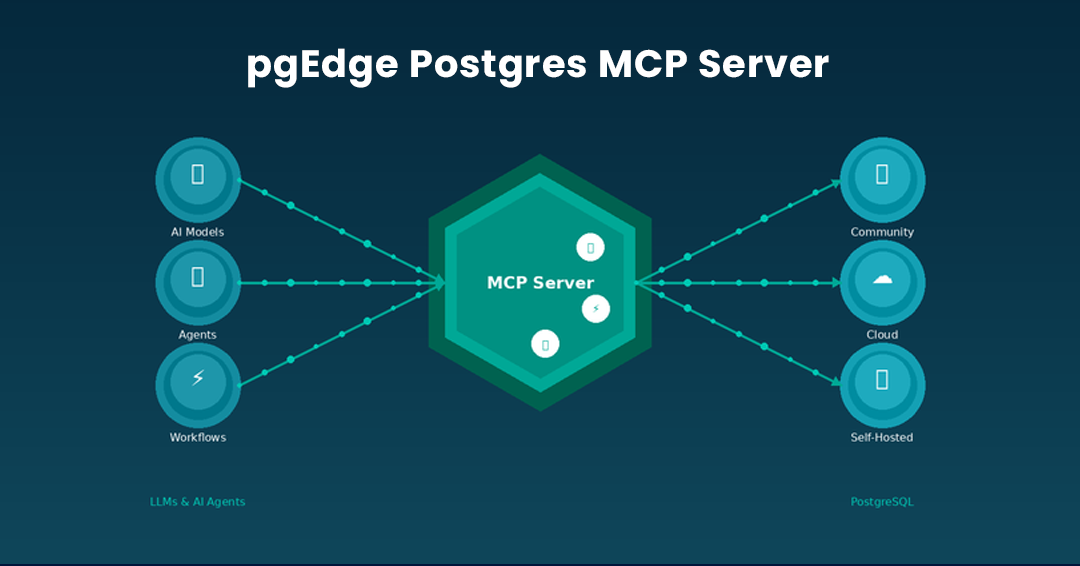
Introducing The pgEdge Postgres MCP Server - And How to Connect it to Claude Code and Cursor
Get started today.
Experience the magic of pgEdge for non-distributed and distributed Postgres deployments.